Inicio /
Insights /
Nube segura, bajo costo: la verdad sobre el VPS replicableSecure cloud, low cost: the truth about the replicable VPS
NubeSeguridadVPSInfraestructuraPYMESColombiaCostosSoberanía de Datos
Nube segura, bajo costo: la verdad sobre el VPS replicable
Secure cloud, low cost: the truth about the replicable VPS
18 de abril de 2026
12 min
DCM System
VPS Replicable: Nube Sin Miedo
Controla tu infraestructura, paga precio fijo, reconstruye en 30 minutos.
[DATO REAL]: El 70% de las pymes colombianas usan hosting compartido de USD $5/mes — el mismo servidor donde viven otros 200 sitios, ninguno bajo tu control. (Estimado DCM System, proyectos 2024-2026)
En este artículo vas a:
- Entender por qué “la nube se hackea” es casi siempre mentira y qué sí falla
- Comparar costos reales COP de cada opción de infraestructura
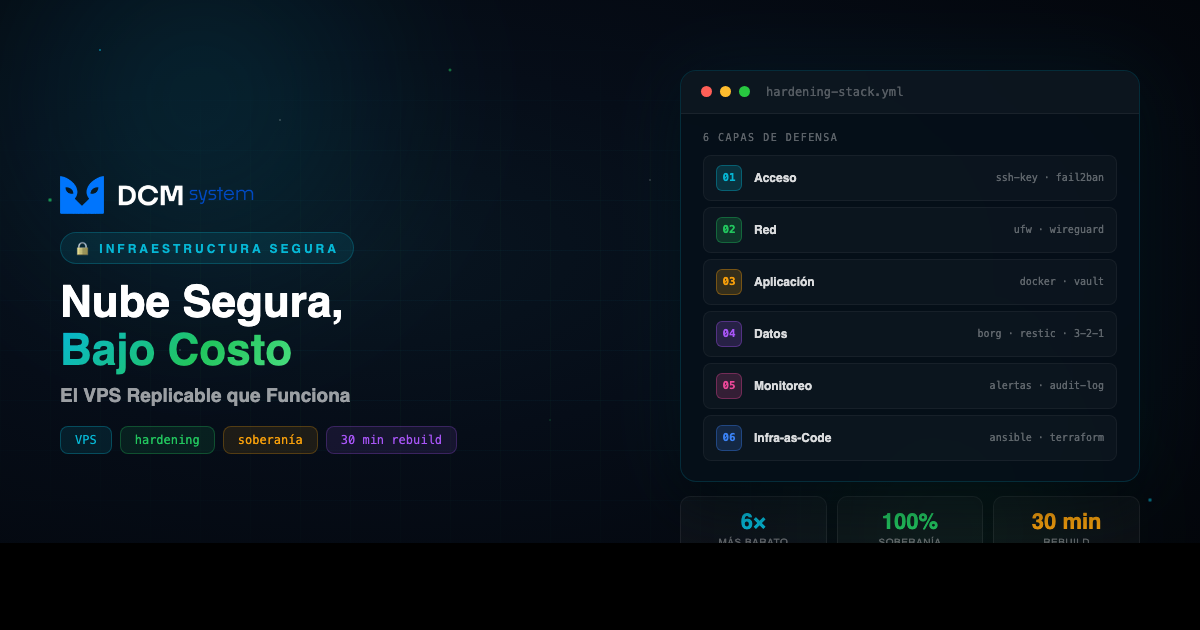
- Conocer las 6 capas de hardening que hacen seguro un VPS
- Saber si el VPS replicable es para tu empresa o no
01 EL PROBLEMA REAL
Cuando un dueño de pyme colombiana dice “la nube es insegura”, al minuto siguiente te muestra el servidor debajo del escritorio de contabilidad: prendido 24/7, sin UPS decente, sin backup offsite, con Windows Server 2012 sin actualizar desde 2019.
El miedo tiene sentido. Los titulares son reales: ransomware que tumba hospitales, datos colombianos en foros de hackers. Pero el miedo está mal dirigido.
La nube no es insegura. La nube mal montada sí lo es. Y nadie explica bien el punto medio: el VPS replicable. Seguro, soberano, costo predecible, y tú lo controlas.
PIÉNSALO ASÍ
El hosting compartido es como vivir en un apartamento donde el vecino del 302 dejó la puerta abierta: el ladrón entra por él y puede llegar a ti. El VPS replicable es tu propio apartamento, con tu propia cerradura, donde tú decides quién tiene llave.
| Antes |
El costo |
Después |
| Servidor bajo el escritorio |
Luz, UPS, fallas, tiempo de sysadmin |
VPS en datacenter, $180k–$600k/mes fijo |
| Hosting compartido de $30k |
El primer incidente — datos perdidos, sin forense |
VPS con 6 capas de hardening, control total |
02 POR QUÉ PASA
Las filtraciones masivas que salen en las noticias casi nunca son falla de AWS o Azure. Son errores de configuración encima de ellos:
- Buckets S3 públicos por error — permisos abiertos, datos descargables por cualquiera
- Llaves de acceso hardcodeadas en GitHub — bots las encuentran en segundos y montan crypto-miners que facturan USD $50.000 en una noche
- Bases de datos expuestas sin contraseña — “era solo temporal”
- Backups sin cifrar en la misma cuenta — ransomware entra, encripta todo, incluidos los respaldos
Ninguno de esos errores es culpa de la nube. Pasan igual en servidores físicos, y pasan más, porque nadie los monitorea.
El mercado ofrece dos extremos que no le sirven a la mayoría: AWS enterprise a COP $3M–$15M al mes, o hosting compartido a $30k–$100k sin control real. El VPS replicable vive en el punto medio que nadie te vende: $180k–$600k, con control total y costo predecible.
03 LA SOLUCIÓN
Un VPS replicable es un servidor virtual dedicado donde tú tienes root, ves los logs, aplicás los parches, y definís las reglas. La palabra clave es replicable: toda la configuración vive como código, los datos se respaldan cifrados en un segundo proveedor, y si algo falla, reconstruís en otro datacenter en 15–30 minutos.
Comparación con números reales — COP mensuales, precios 2026:
| Opción |
Costo/mes |
Control |
Escalabilidad |
Soberanía |
| Hosting compartido |
$30k – $100k |
Ninguno |
Muy baja |
Ninguna |
| AWS/Azure básico |
$800k – $2.000k |
Medio |
Alta |
Media |
| AWS enterprise |
$3.000k – $15.000k |
Alto (si sabes) |
Total |
Alta |
| VPS replicable (DCM) |
$180k – $600k |
Total |
Alta |
Total |
| Servidor físico en oficina |
$200k – $500k* |
Total |
Cero |
Total |
*No incluye electricidad, UPS, enfriamiento, fallas de hardware, y el “costo invisible” de que si se va la luz tres días, el negocio se para.
Una máquina de 4 vCPU, 8 GB RAM, 160 GB SSD cuesta entre $60k y $180k/mes según proveedor. No son los $30k del hosting barato, pero está a años luz de los $3M de enterprise — y con control total que el enterprise tampoco te da si no lo configurás bien.
Lo que más importa: si mañana el proveedor empieza a portarse mal, levantás todo en otro proveedor en media hora. Esa propiedad es lo que te libera de la dependencia tóxica con un solo vendor.
04 CÓMO IMPLEMENTARLO
El stack de hardening que montamos por defecto en cada cliente — no es magia, es disciplina:
Capa 1 — Acceso
- SSH solo con llaves criptográficas (contraseñas deshabilitadas)
- Puerto SSH cambiado del 22 (reduce ruido de bots en 99%)
fail2ban: banea IPs tras 3 intentos fallidos- Acceso administrativo solo por VPN (Wireguard o Tailscale) — el panel nunca queda expuesto a internet
Capa 2 — Red
- Firewall (
ufw / nftables) con política de denegación por defecto
- HTTPS con Let’s Encrypt en todo lo público, auto-renovación cada 60 días
- Headers de seguridad: HSTS, CSP, X-Frame-Options, X-Content-Type-Options
- BD separada de la capa web — nunca habla directo a internet
Capa 3 — Aplicación
- Actualizaciones de seguridad automáticas (
unattended-upgrades en Debian/Ubuntu)
- Contenedores Docker: si un servicio se compromete, no toca a los demás
- Secretos en variables de entorno o vault local, nunca en el código
Capa 4 — Datos (política 3-2-1)
- Backups automáticos diarios con
borg o restic, cifrados en el cliente antes de salir del servidor
- Respaldos en segundo proveedor geográficamente separado (VPS en Bogotá → backups en Hetzner Alemania o Backblaze US)
- 3 copias, en 2 medios, 1 offsite
- Pruebas de restauración mensuales automatizadas — un backup que nunca probaste no es un backup
Capa 5 — Monitoreo
- Uptime externo (UptimeRobot, Better Stack)
- Alertas automáticas a Telegram o email cuando algo cae, el disco se llena, o hay intrusión sospechosa
- Logs de seguridad auditables — quién entró, cuándo, qué hizo
Capa 6 — Infraestructura como código
- Toda la configuración en Ansible o Terraform, versionada en git
- Si el servidor se daña: nueva máquina, corres el playbook, restaurás el backup — 30 minutos y operando
- Cero dependencia de “lo que está en la cabeza del sysadmin”
05 ¿ES PARA TI?
Sí, si tu empresa:
- ✅ Maneja datos sensibles con obligaciones legales (clínicas, bufetes, fintech, logística — Ley 1581 de habeas data)
- ✅ Tiene una aplicación propia con backend (portal de clientes, app móvil, sistema interno) y necesita un servidor que sea suyo
- ✅ Tiene presupuesto TI entre COP $500k y $2M mensuales para infraestructura
No, si:
- ❌ Tu carga tiene picos de tráfico totalmente impredecibles (e-commerce en Black Friday con 10x) — necesitás auto-scaling real en nube
- ❌ No tenés ningún conocimiento técnico interno y no vas a contratar a nadie que lo administre — un VPS necesita mantenimiento; si nadie lo va a cuidar, quedáte en hosting gestionado
Preguntas frecuentes
¿Qué pasa si el proveedor VPS quiebra o me falla?
Con infraestructura como código y backups cifrados en un segundo proveedor, levantás todo en otro datacenter en 30 minutos. Es exactamente la propiedad de “replicable” — la configuración no vive solo en un servidor, vive en git.
¿Tengo que saber Linux para esto?
Para administrarlo solo, sí. Pero podés contratar a quien lo administre (nosotros lo hacemos). El punto es que alguien lo cuide — no que quede abandonado como el servidor bajo el escritorio.
¿Dónde viven los datos? ¿Puedo que se queden en Colombia?
Sí. Si tu sector lo requiere (salud, legal, financiero), pagás un VPS en un datacenter en Bogotá. Si necesitás más performance, Miami. Cambiar es un script.
Acción inmediata: Mirá tu factura de hosting actual y calculá qué datos tenés ahí que no podés perder. Si no sabés responder “¿dónde están los backups y cuándo los restauraste por última vez?”, ese es tu problema #1 — antes de cualquier migración.
¿Quieres ayuda? → Habla con DCM — llevamos 12 años montando esta infraestructura para clientes en Colombia.
Replicable VPS: Cloud Without Fear
Take control of your infrastructure, pay a flat price, rebuild in 30 minutes.
[REAL DATA]: 70% of Colombian SMBs use shared hosting at USD $5/month — the same server where 200 other sites live, none of them under your control. (DCM System estimate, 2024–2026 projects)
In this article you will:
- Understand why “the cloud gets hacked” is almost always a myth, and what actually fails
- Compare real COP costs of every infrastructure option
- Learn the 6 hardening layers that make a VPS secure
- Decide whether the replicable VPS is right for your company or not
01 THE REAL PROBLEM
When a Colombian SMB owner says “the cloud is insecure,” the very next minute they show you the server sitting under the accountant’s desk: powered on 24/7, with no decent UPS, no offsite backup, running Windows Server 2012 that has not been updated since 2019.
The fear is understandable. The headlines are real: ransomware that takes down hospitals, Colombian data turning up on hacker forums. But the fear is pointed in the wrong direction.
The cloud is not insecure. A poorly built cloud is. And nobody explains the middle ground well: the replicable VPS. Secure, sovereign, predictable in cost — and yours to control.
THINK OF IT THIS WAY
Shared hosting is like living in an apartment where the neighbor in 302 left the door open: the burglar walks in through them and ends up at your door. A replicable VPS is your own apartment, with your own lock, where you decide who has the key.
| Before |
The cost |
After |
| Server under the desk |
Power, UPS, failures, sysadmin time |
VPS in a datacenter, $180k–$600k COP/month flat |
| Shared hosting at $30k |
The first incident — data lost, no forensics |
VPS with 6 hardening layers, full control |
02 WHY IT HAPPENS
The mass breaches you read about almost never come from a failure of AWS or Azure. They come from misconfigurations on top of them:
- Public S3 buckets by accident — open permissions, data downloadable by anyone
- Hardcoded access keys in GitHub — bots find them in seconds and spin up crypto-miners that bill USD $50,000 in a single night
- Databases exposed without a password — “it was just temporary”
- Unencrypted backups in the same account — ransomware enters, encrypts everything, including the backups
None of these errors are the cloud’s fault. They happen on physical servers too, and more often, because nobody monitors them.
The market offers two extremes that do not serve most companies: enterprise AWS at COP $3M–$15M per month, or shared hosting at $30k–$100k with no real control. The replicable VPS lives in the middle ground nobody sells you: $180k–$600k, with full control and predictable cost.
03 THE SOLUTION
A replicable VPS is a dedicated virtual server where you have root, you see the logs, you apply the patches, and you set the rules. The keyword is replicable: the entire configuration lives as code, the data is encrypted and backed up to a second provider, and if anything fails, you rebuild in another datacenter in 15 to 30 minutes.
Comparison with real numbers — monthly COP, 2026 prices:
| Option |
Cost/month |
Control |
Scalability |
Sovereignty |
| Shared hosting |
$30k – $100k |
None |
Very low |
None |
| Basic AWS/Azure |
$800k – $2,000k |
Medium |
High |
Medium |
| Enterprise AWS |
$3,000k – $15,000k |
High (if you know) |
Full |
High |
| Replicable VPS (DCM) |
$180k – $600k |
Full |
High |
Full |
| On-premise server |
$200k – $500k* |
Full |
Zero |
Full |
*Does not include electricity, UPS, cooling, hardware failures, or the “invisible cost” that if power goes out for three days, the business stops.
A 4 vCPU, 8 GB RAM, 160 GB SSD machine costs between $60k and $180k per month depending on the provider. That is not the $30k of cheap hosting, but it is light-years from the $3M of enterprise — and with full control that the enterprise tier does not give you either if you do not configure it correctly.
What matters most: if tomorrow the provider starts misbehaving, you spin everything up at another provider in half an hour. That property is what frees you from toxic single-vendor dependency.
04 HOW TO IMPLEMENT IT
The hardening stack we deploy by default for every client — not magic, just discipline:
Layer 1 — Access
- SSH with cryptographic keys only (passwords disabled)
- SSH port changed from 22 (cuts bot noise by 99%)
fail2ban bans IPs after three failed attempts- Admin access only via VPN (Wireguard or Tailscale) — the panel is never exposed to the internet
Layer 2 — Network
- Firewall (
ufw / nftables) with deny-by-default policy
- HTTPS via Let’s Encrypt on everything public, auto-renewed every 60 days
- Security headers: HSTS, CSP, X-Frame-Options, X-Content-Type-Options
- Database isolated from the web tier — never speaks directly to the internet
Layer 3 — Application
- Automatic security updates (
unattended-upgrades on Debian/Ubuntu)
- Docker containers: if one service is compromised, the others are not
- Secrets in environment variables or a local vault, never in the code
Layer 4 — Data (3-2-1 policy)
- Daily automated backups with
borg or restic, encrypted on the client before leaving the server
- Backups stored at a geographically separate second provider (Bogotá VPS → backups in Hetzner Germany or Backblaze US)
- 3 copies, 2 media, 1 offsite
- Automated monthly restore tests — a backup you have never tested is not a backup
Layer 5 — Monitoring
- External uptime monitoring (UptimeRobot, Better Stack)
- Automatic alerts to Telegram or email when something goes down, the disk fills up, or there is a suspicious intrusion
- Auditable security logs — who got in, when, what they did
Layer 6 — Infrastructure as code
- All configuration in Ansible or Terraform, versioned in git
- If the server fails: new machine, run the playbook, restore the backup — 30 minutes and operational
- Zero dependence on “what is in the sysadmin’s head”
05 IS THIS FOR YOU?
Yes, if your company:
- ✅ Handles sensitive data with legal obligations (clinics, law firms, fintech, logistics — Ley 1581 habeas data)
- ✅ Has its own application with a backend (client portal, mobile app, internal system) and needs a server that is genuinely yours
- ✅ Has a tech budget between COP $500k and $2M monthly for infrastructure
No, if:
- ❌ Your workload has wildly unpredictable traffic spikes (e-commerce on Black Friday with 10× traffic) — you need real cloud auto-scaling
- ❌ You have no internal technical knowledge and will not hire someone to manage it — a VPS needs maintenance; if nobody is going to take care of it, stay on managed hosting
Frequently asked questions
What happens if the VPS provider goes bankrupt or fails me?
With infrastructure as code and encrypted backups at a second provider, you bring everything up in another datacenter in 30 minutes. That is exactly the point of “replicable” — the configuration does not live only on one server, it lives in git.
Do I need to know Linux to do this?
To administer it yourself, yes. But you can hire someone to manage it (we do that). The point is that somebody takes care of it — that it does not end up abandoned like the server under the desk.
Where does the data live? Can it stay in Colombia?
Yes. If your sector requires it (healthcare, legal, financial), you pay for a VPS in a Bogotá datacenter. If you need more performance, Miami. Switching is a script.
Immediate action: Look at your current hosting bill and figure out which data you cannot afford to lose. If you cannot answer “where are the backups, and when was the last time you restored them?”, that is your first problem — before any migration.
Need help? → Talk to DCM — we have spent 12 years deploying this infrastructure for clients across Colombia.